Thursday, January 28, 2010

ChickenPing


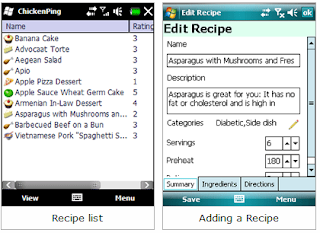
ChickenPing is a recipe organizer which lets you create, download, rate and share recipes.

It offers:

Scale recipes for more or fewer servings
Create shopping lists automatically
Add photos of the finished dish, then upload to Flickr or Picasa
Find something to cook using "What's in the Fridge"
USDA Nutritional analysis for 7000+ foods
Import from RecipeML, MealMaster, MasterCook and FDX formats
High contrast mode with text-to-speech for when you're in the kitchen.
Take recipes with you on a Windows Mobile smartphone
Share or download recipes from ChickenPing's database
Plan Meals
Print recipes, shopping lists or meal plans
... and much more

ChickenPing

Tuesday, January 19, 2010

IMDb Mobile


Unlike other IMDb apps which parse IMDb pages for information, this app uses the iPhone IMDb API to retrieve information from IMDb.com and display it on your Windows Mobile.

Features:
- Search Movies/TV/Video Games/Actors
- Finger-friendly interface
- DVD Covers
- Actor Headshots

Requirements:
.NET Framework 3.5

IMDb Mobile

Sunday, January 17, 2010

Rapidshare Downloader


simple app to download rapidshare.com files

App written in C# .NET 2.0, tested on HTC Topaz

Downloaded files are stored in \Storage Card\Downloads\
Rapidshare links are stored in \Storage Card\Downloads\files.txt (after edit via external editor, app have to be restarted)

Rapidshare Downloader

ArkSwitch


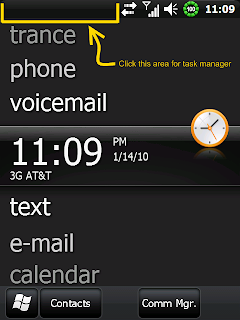
easy task manager specifically for WM6.5.x

VERY IMPORTANT! This application is NOT intended for the original WM6.5 or below. Only for WM6.5.1 and above! If you use it with WM6.5 or below, your device may become unstable.

HOW TO USE:
1. Install the CAB.
2. Either reboot (it will run on startup) or start it from the start menu --> Tools.
3. Click the left half of the top bar to bring it up.

ArkSwitch

Friday, January 15, 2010

NightStand


NightStand is a simple alarm clock application with large numbers to be easily seen.

It allows for the phone to dim the screen but keeps it from turning off for that middle of the night glance to see what time it is.

Features Include:

Alarm with 8 sounds
Custom Color of the Digits
5 Minute Snooze Button
Solve an easy math problem to help you wake up (to you turn alarm off)
Automatically runs on AC power (optional)
12/24 Hour setting

How To Use:
When you run the application click on the configure button (upper right corner) to set all the settings

Three sliders allow you to set the custom color.
Alarm toggle to set the alarm and the sound.
AC Toggle to set Auto mode.

When the alarm is going off, click the snooze button to snooze or click anywhere on the screen to stop the alarm.

NightStand

Nice+


Manage your workout and get your health back on track. With Nice+, you can record your workout whereever, whenever.

Manage your workout using Nice+ more easily, efficiently, and enjoy running!

Workout modes
- Basic
- Time
- Calories
- Distance

Other features
- History and sync
- Settings

You can sync your workout history on the web (http://paperspoon.net) and see additional detail information about your workout, such as displaying your workout path on a map.
You can also register your Twitter account and let others know what you did.

Nice+