Showing posts with label shopping. Show all posts

Sunday, August 08, 2010

Mobile Shopping List


a simple shopping list application with HTC Sense Interface Style.

Prerequisite:
Microsoft SQL Server Compact 3.5 SP2 for WM

Mobile Shopping List

Friday, July 30, 2010

AmazonIt!


AmazonIt! helps you shop. Ever see an item on the shelf that looks interesting, but you wonder
A) if you can find it cheaper online?
B) if it's any good?

That's where AmazonIt! comes in. Using AmazonIt!, you can scan a product's UPC or EAN barcode, and see its Amazon.com price and ratings.
AmazonIt! will also show you if the price of an item has changed since it was last updated.

How It Works
AmazonIt! uses a converted version of the java library Zxing to detect barcodes. It then uses Amazon's Product Advertising API in order to retrieve product information.

Requirements
Windows Mobile 5 or greater
.NET CF 3.5 or greater
Unlimited Data plan (HIGHLY RECOMMENDED)

AmazonIt!

Monday, March 22, 2010

MiCarrito


Shopping List application

With MiCarrito you can:
• Sort the shopping list by product categories to make shopping easier and faster.
• Create recipes defining lists of ingredients. Add all the ingredients in a recipe directly to the shopping list.
• Sort product categories in the list to fit the path you usually follow in the supermarket.
• Develop new products and categories, and re-assign products to a different category.
• For each product you can select the unit of measure and its price.
• For each product you can see the quantity that you bought of that same product during the last week and the last month.
• Synchronize your shopping list with your partner or a friend.
• Once in the supermarket, you can move the products from the shopping list to the shopping cart/trolley. Besides, you can set the current price and see the price it was the last time you bought it.
• As you fill the cart you will see the number of products in it and total amount of your shopping.

It has been tested in QVGA, VGA and WVGA resolutions.

BTW, the default language is Spanish and it is localized in English, so those of you with the PDA in a different language than English will get it in Spanish

MiCarrito

Sunday, February 28, 2010

Shopping List Mobile


a simple application to make lists of what you need to buy.

So that way, when you remember to buy something, you put it in the list, and when you need to remember what to buy, you just have to load the list.

Pretty basic stuff.

How to use
It's pretty simple. When you open the application, you’ll have a text box and some buttons. The Add button will add to the list what is written in the text box. The Remove button will remove the selected item from the list. The Clean button will clean the list. Then you have the Save List, Load List, Delete list and About menus. Those are pretty obvious.

How to Install
Run the CAB file from your phone.

Requirements
Windows Mobile 6 ( not tested with previous versions )
.Net Framework Compact 3.5


Shopping List Mobile

Tuesday, November 24, 2009

Shopping List Manager


Never forget your shopping lists on your kitchen counter again – simple have them with you on your mobile anytime

The valuephone Shopping Lists Manager conveniently and clearly organizes any number of Shopping Lists. On the mobile and in the personal valuephone user area, Shopping Lists can be set up, edited, saved and used again.
The Shopping Lists Manager has a special "Shopping" mode, which, among other things, provides the feature to mark an item as "Got it". Afterwards, you can hide the found or bought items. This immediately makes your shopping list easier to follow.
If your shopping list is particularly long, the search feature will help you find a specific item. Should you remember another item that you need to buy during your errands, you can simply add it to the shopping list as well and be well prepared for your next trip to the store.
In the overview of all of your shopping lists, you can see which lists you have already been able to completely or partially check off or which are still open. By means of the feature "Reactivate list", you can use the shopping list again for your next shopping errand.
Another tip: Why not just set up the according shopping lists for all of cooking or baking recipes?

Shopping List Manager

Wednesday, July 08, 2009

ShopEasy


Ever been to a super store, walked through all the isles and been back home just to find that you forgot to buy something? or simply don't have the memory to remember the long list of shopping items. Then this is for you.


ShopEasy is a software designed for Windows Mobile 6.1 devices and helps you to shop!
It helps you to maintain your shopping list in a simple and easy to use manner. Before you go shopping, just run the software, select them items you want to shop and away you go, never to forget an item. You can keep track of items as you buy using the software so that, you are never in doubt if you have bought it or not.

Features:

1) Easy and Simple way to maintain your shopping list.
2) Help Facility for software.
3) Fast and efficient.

Specifications and Requirements:

Devices: Windows Mobile 6.1 devices. Screen shots from HTC Touch Diamond.

You will need: 1) Microsoft .Net Compact Frame work 3.5 to run the software. You can download this from Microsoft Website.

ShopEasy

Thursday, June 11, 2009

HandyShopper


HandyShopper is a tool for managing your shopping lists.

It helps you build a shopping database that remembers everything you've purchased before, so that you can find them in your "All" list (master list) and mark them as needed so they appear in your "Need" list. When you go shopping, you check off items from your list as you put them in your cart, then after you pay for them you use the "Checkout" command to move the checked-off items back to the "All" list (items that aren't checked off yet stay in the "Need" list). Even though HandyShopper is designed for shopping lists, you can use it for other kinds of lists, too.

Here are a few of the many features of HandyShopper:

Create as many databases as you wish (shopping lists or other lists).
Mark items in your database (list) as Needed, and once you finish shopping, the items are remembered so you can quickly reuse them later.
You can keep track of how many of each item you need, what the price is, the aisle where the item is located, whether the item is taxable, and more.
Tap an item and hold the stylus down for half a second to pop up a context menu with some common actions.
A special one-handed mode lets you mark off items with one hand, without having to pull out the stylus.
The Total command adds up the total amount for the items you have marked as Needed, and the total amount of the items you've put in your cart.
Notes can be attached to items.
Each database can be sorted by any of the fields (up to 3 fields at a time).
Keep track of up to 100 stores per database, and which items are available at which stores.
Stores that have needed items show up in bold in the Stores dropdown list.
Organize items in up to 100 categories per database.
The column widths in the list view can be resized by dragging the column header divider bars.
Optionally keep track of prices and aisles for an item on a per-store basis.
Copy an item to another database, including which stores the item is available at.

HandyShopper

Friday, September 19, 2008

SaleCalc


Enjoy the shopping with SaleCalc

A smart tool running on you PPC to calculate the item price to pay after dicounted percentage.

System requirement:

Windows mobile 5/6

Sale Calculator

Tuesday, January 09, 2007

MyShopping - FREEWARE POCKETPC


This is a simple software I built for myself when I am going alone for shopping.

I came with this idea when my wife gives me a big list which I can not remember and have to search for Paper and pen to write them down. Searching for a paper and a pen itself is bigger task as my Son (who is going to be two years old) does not let me use them and instead wants for himself.
I have tried to use lot of other shopping PPC softwares available in the net but, they were too complecated or missed some of the basic requirements.
I wanted to share this software with my viewers. - T Mohan Kumar
Size: 26 KB
Date: December 29, 2006
Type: Freeware
Requirements:
• Windows Mobile 5.0
• .NETCF v2.0


DOWNLOAD

Wednesday, December 20, 2006

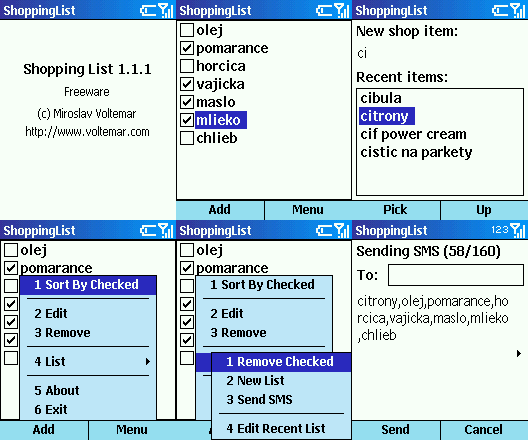
Shopping List - FREEWARE SMARTPHONE


Shopping List by Miroslav Voltemar

A handy shopping list manager in your Smartphone. Helps you remember all your shopping list items, organize them or send them via SMS if needed. Best of all it's FREE.

DOWNLOAD