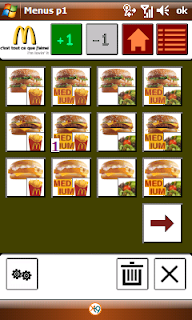
Description:
When we are in a group, it is not always easy to remember the order to be make at McDonalds...
If we are driving and that we should speak to a microphone, with kids screaming...!
And as we do not always pencil or paper in hand ... here is the solution (and only to date as I know), Windows Mobile, to be able, easily, take note of the order, read it after directly.
And also, why not send it by SMS... if you want your friends (or your wife) to speedy go to McDonalds !
Use:
Its usage is simple:
- Click on the image of the desired section:
1st line = Sandwiches - Beverages - Coaching
2nd line = happymeal - Menus - Salads
3rd line = Dessert - Breakfast - Specials
- In the category "Special" are of special items, limited in time
- Once in a category, click on the image to increment the counter (1)
- If you want to remove an item, click on "-1", then click on the item to a decrement
- If you want to erase all selections from the page of the current category, click on the trash
- If you click on "List" (top right), you arrive on the checkout. Here, you can completely erase button ("Trash") or send the command shown by SMS (button "SMS")
- To return to the first page, click on "House"
- To change the language, click on "Options" at the bottom left
Langue: french, english
McDoWMobile

