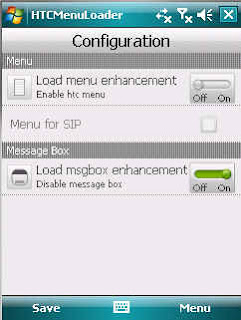
Htc Menu Loader is a little service application that loads htc menu enhancement in all windows build, even in windows mobile emulator!
Now it also replaces standard messagebox with a more finger friendly one and comes with a finger friendly config utility.
Usage:
- install .net compact framework 3.5
- (W)QVGA: install cabs beginning with QVGA_WM65 from attached zip (W)QVGA_HtcMenuEnhancementPkgs.zip (note: QVGA version is from HTC Mega/Touch2 rom version 1.33). Optimized for wm6.5.1 (start menu on top), works with vm6.5.3 with some graphical problems.
- (W)VGA: you should install/cook these packages into your rom:
HTCFont_Link_1_0_19132133
HTCFramework_1_5_19223320
HTCScroll_2_0_19221326
Menu_Enhancement_1_1_20113129
SharedResource_1_0_20111720
Shared_Modules_1_01_20113224
- (W)(Q)VGA: install (Q)VGA_WM61_HTCScroll_fix.cab (also in zip file) if you have WM 6.1
- install one of these cabs
francarl.HTCMenuLoader-BootLauncher.v1.41.cab (if you have HTC BootLauncher into your ROM)
trancarl.HTCMenuLoader.v1.41.cab
- reboot
after reboot, you can use configuration utility into Programs folder to enable or disable enhancements. By default, htc menu loader is disabled, instead msgbox enhancement is enabled.
Registry key for configuration (or use use configuration utility!):
[HKEY_LOCAL_MACHINE\Software\HTCMenuLoader]
EnableSIP=1 ; 1 = enable ezinput sip menu popup, 0 show standard window sip menu (default 0)
EnableMenu=1 ; 1 = enable htc menu enhancement (default 0)
EnableMsgbox=1 ; 1 = enable messagebox replacement (default 1)
Note:
- EnableSIP=1 works GREAT if you want to access EzInput custom menu to access options, change language and layout
HTC Menu Enhancement Loader

