Showing posts with label taskmanager. Show all posts

Wednesday, September 08, 2010

MMTaskManager


MMTaskManager is a small and simple task manager that allows you to easily and quickly switch between current running applications. It also allows you to close any selected application or all applications right on your finger tips.

In additional to closing applications, MMTaskManager reports how much memory each of the application uses to see which application takes up the most space in memory. The app also display the total amount of memory your device has as well as available memory.

Features:
Task Switcher
Fully close a running application by tapping on the X button (both WM 6.5 and WM 6.5.x)
Position fix for old apps running on WM 6.5.x
Soft reset
Memory usage report (Total, available, app usage, etc)
Multi-language
Skinning

Requirements & Supports:
.NET Compact Framework 3.5
Windows Mobile 6.x Professional
QVGA, VGA, WVGA, and Square Screen Support
Landscape Support
AppToDate Support

MMTaskManager

Monday, July 26, 2010

SpoonDo


A friendly manager for your Outlook Tasks

SpoonDo! is a simple application for Windows Mobile, designed to replace the default Outlook Tasks functionality.
Unlike the default tasks application, SpoonDo! is finger friendly, so everything can be done without using the stylus.
SpoonDo! presents the tasks in different folders distinguishing between different type of tasks.
By clicking on a folder, a list of tasks is presented – sorted by the due dates of the tasks (if exist).
Using the arrows enables easy browsing between folders and tasks.
SpoonDo! holds a simple method for adding and modifying existing tasks, so that using the Outlook tasks will become simple and effective.
When adding or modifying a Task, it’s very easy to enter the details, including optional information such as priority, due date and reminders.
The ‘Urgent Tasks’ folder presents tasks from all categories which are due to end soon.

* Finger friendly user interface
* Arrange tasks in different folders
* Easy task creation
* Special view for urgent tasks

SpoonDo

Sunday, January 17, 2010

ArkSwitch


easy task manager specifically for WM6.5.x

VERY IMPORTANT! This application is NOT intended for the original WM6.5 or below. Only for WM6.5.1 and above! If you use it with WM6.5 or below, your device may become unstable.

HOW TO USE:
1. Install the CAB.
2. Either reboot (it will run on startup) or start it from the start menu --> Tools.
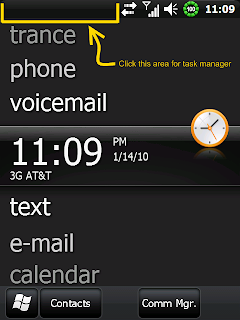
3. Click the left half of the top bar to bring it up.

ArkSwitch

Monday, January 11, 2010

Monday, October 19, 2009

The Tool


The Tool is yet another one file explorer and task manager.

This application is still in the alpha stage, more details will be avalible soon.

The Tool

Saturday, July 11, 2009

e-Natives Showcase v1.0.0 [07-10-09]


Finger Friendly Task Switcher + X Button Enhancement

Showcase X Enhancement:


Showcase X Enhancement is e-Natives Showcase Addon that change the native Windows Mobile's X button behavior into the useful and FingerFriendly Task Tool... [ ups... I don't know what is the best words for this addon ].

In the fact this Addon is standalone proccess which run in background and only eat 1kb memory

Change Log:
1.0.0
- Add Showcase Settings/Configuration
- Tweak Showcase Task Switcher for faster start.
- Add Home Icon
- Minimalizing memory usage ;)
- Removing unused resources in Showcase.exe and Showcase_X.exe
- Add smaller icon for Showcase_X, now even smaller exe size
- Stable Testing, and fixing possibility memory leaks...

RC3
- Add Showcase X Enhancement into Package
- Showcase X Enhancement run on startup, [ to disable it, delete the ShowcaseXLauncher.lnk file on \Windows\StartUp ]
- Add change HTC TaskManager Registry to disable it.

RC2
- Add support resolution for WQVGA/WQVGA Landscape and QVGA SQUARE.

RC1
- Add support resolution for WVGA/WVGA Landscape/QVGA/QVGA Landscape
- Skin File now in external file
- Add Icons
- Now as CAB, you just Install it and enjoy it.

BETA-2:
- Add Used Memory/RAM percentage - tap it will take you into system memory info just like HTC Task Manager
- Remove Switch Button. Now you only need to select the list
- Add pushed close button
- Compress PNG files into 8 bit - Look at previous file size with this new one
- Add support for VGA Landscape (WVGA Cooming soon)


e-Natives Showcase

Sunday, April 06, 2008

AppSentry


Kills tasks even when you are not using your phone

NOTE: The method used to allow AppSentry to not run in background like other task managers is not supported on all phones/PPCs. I do not have a list of capatible devices. It will nto harm any device, but the schedule may not work as desired.

This Task Manager does not run in the background...

This Task Manager does not require you to run it...

This Task Manager kills running tasks at a schedule you set with or without notification.

There are 2 main ways to run AppSentry:

1. Manual: Run it from shortcut or map it to a hardware key. It will popup and show you the list of tasks running. If you selected the countdown option then it will countdown the number of seconds and the automatically kill the tasks. Without countdown. AppSentry will wait for you to click OK, Cancel, or Settings.
2. Scheduled: In options, tell AppSentry how often to run. After the interval you specify, it will popup and behave the same as above.


Other options include vibrate on popup, sound as the timer ticks down, and an exclusion list for apps you do not ever want to automatically kill.

Requires PPC, .Net 2.0, WM2003, WM5.0, WM6.0, WM6.1

This is an Alpha release. Tested on WM6 and WM6.1, and on Kaiser, Wizard, and Touch. Please post with any comments or suggestions. Thank you XDA!

NOTE: Be aware that arbitrarily stopping tasks is potentially harmful. I will not accept any responsibility for anything AppSentry does or does not do. USE AT YOUR OWN RISK.

sahoopes of XDA-Developers

Tuesday, February 19, 2008

ProcessManager


Process Manager is a system application used to manage applications, processes, memory and services on WIndows Mobile devices.

Process Manager is a system application used to manage applications, processes, memory and services on WIndows Mobile devices. The user can peruse applications, processes and services and control many related aspects. Detailed application or process information can be retrieved: such as thread, window and module information. A memory usage warning feature can be configured to provide notifications if memory usage exceeds a predetermined threshold. Also, the application can be configured to periodically write a log of running processes to a file. The application minimizes to the Today screen notification tray, for easy and quick access.

ProcessManager

Wednesday, December 19, 2007

OPTasks


OPTasks is a Task list (or Todo list) for PocketPC. It is compatible with the windows mobile bundled software (pocket outlook), but it is different because:

* It is more flexible
* It is designed to have the most used functions only a click away
* The task list can hold more tasks in a single screen because of smaller font
* Same for categories, and the list is scrollable
* Icons on the menu bar, double click, no slow tap-and-hold and other nasty things like that
* Keyboard shortcuts for fast navigation
* Four filters to control task list contents
* Quink insert mode: to create a new task, just type the subject and click enter! (version 0.5 and newer only)

OPByte

Wednesday, October 03, 2007

WkTASK


WkTASK shares features of both Task Manager and Program Launcher for Windows Mobile 5/6. ou can switch all running programs smoothly like desktop Windows, and launch applications easily. Not only stylus operation but also key operation is available. Although the look & feel closely matches the theme color and make the 3D gradation, its CPU and memory usage are low.

Features
# Task-list

Using the upper bar, you can watch, switch, close and force termination running programs.

To exclude a task from the list, tap&hold it and select 'Hide'.
# X button

Using the X button, you can use some actions as follows:

* Tap: really close
* Tap&Hold: show context menu
* Drag: some gestures (To minimize, drag toward down. To show Today, drag toward left.)

# Program Launcher

Using key or tap, You can launch some applications, functions and contacts(phone call or e-mail).
# Key operation

To shift the Key operation mode, double-execute WkTask.exe or WkTaskCmd.exe(recommended because of smaller size). Some start options are available too.
# Brightness/Volume controller

You can control them in real time with key or tap.
# Other functions

rotation, suspend, reboot, network connection, etc.
# Preferences

To customize, it has a great deal of parameters. Enjoy your self!

soft.photoracer.net

Wednesday, June 13, 2007

Dynamo


Dynamo 2 is a cool, animated task manager for your PocketPC 2003 device.

Say goodbye to boring text lists of running programs and instead manage your programs by sliding in images of all your running applications onto your screen. For each program on your device an image is saved and when you click the hotkey they all zoom onto your screen. Simply click the one you want and it will increase to fill the screen. Quickly seeing all the running programs is far more efficient than having to read through a text-based task list so Dynamo can make task switching a much faster, and cooler, experience.

Aspecto Software

Saturday, May 05, 2007

tMan v0.9.6


Update.

tMan is a tiny task manager.

What's New in 0.9.6

* Added: List of applications to ignore
* Added: Application exceptions
* Added: Minor GUI reorganization
* Added: Kill task forcibly
* Added: User-defined colors for background and foreground (TWEAK)
* Added: Power off item in task menu
* Added: Show task operations in task menu
* Added: Confirm dialog before soft-resetting the device (TWEAK)
* Fixed: Improved stability
* Fixed: Action key closed an application at certain situations
* Fixed: Task menu invocation rewritten
* Fixed: Terminating tMan before installation (for upgrading)
* Fixed: Minor fixes

Operating system:

* PocketPC 2003/SE
* Windows Mobile 5.0

Hardware:

* 200 MHz processor (ARM based).
* 16 MB RAM.

pda.jasnapaka.com