Showing posts with label PC utilities. Show all posts

Saturday, November 21, 2009

FindDup


Find duplicate files in your ROM

The main feature of this program - it compares all the files in given folders binary and it can found duplicates even if the names of files are different.

HOWTO use:
1. Add folder to "Look in" list. You can use drag'n'drop.
2. Select "Search \ Start" from menu, or click "Start" icon on the toolbar.
3. If there are duplicates - you will see them in a list.

FindDup

Wednesday, November 04, 2009

RecModFolder

fast module to file conversion

This tool will do all these steps for me.
Just select parameters:
1. Folder - folder with modules, for example SYS\21872,
2. Mask (optional) - any mask that is valid in windows is acceptable,
(common masks are *.dll, *.cpl, *.exe, *.mui), no mask means "*".
3. Count (optional) - how many modules to convert, no count means "convert all".

=======================================

Example 1:
>RecModFolder.exe c:\xda\v1\SYS\21054
means - RecMod all modules in c:\xda\v1\SYS\21054 recursive

=======================================

Example 2:
>RecModFolder.exe c:\xda\v1\SYS\21054 *.exe
means - RecMod all exe modules in c:\xda\v1\SYS\21054 recursive

=======================================

Example 3:
>RecModFolder.exe c:\xda\v1\SYS\21054 *.dll 10
means - RecMod first 10 dll modules in c:\xda\v1\SYS\21054 recursive

=======================================

Algorithm

Code:
read parameters from command line
find all modules in given folder (recursive) using given mask
for each module folder
{
call RecMod
create temporary unique file name (GUID for safety reason)
move new file to parent folder and assign it temporary name
delete module folder (with all files)
rename new file, give it real module name
if (count >= requested count)
{
stop
}
}
=======================================
Installation
make sure you can run RecMod from console, add its folder to PATH or drop RecModFolder.exe to the same folder.
That's it.

=======================================
Tips
You can create shortcut to RecModFolder and drop folders on it from explorer or Total Commander. RecModFolder will convert all modules in that folder to files.

Backup your files. This tool doesn't ask any questions,
it just informs you in case of error and stops immediately.
Save log file and check it for errors.

This is console application - you can use it in bat files.

You can save output of this program to text file - add >fileName.txt to your command line.
example:
RecModFolder.exe c:\xda\v1\SYS\21054 *.dll 10 >log.txt
this command will call RecMod first 10 dll modules in c:\xda\v1\SYS\21054 recursive
and save its output to log.txt.

Do not open folders you want to delete (replace with files) in explorer (or Total Commander, FAR, etc.) while this program works.

RecModFolder

Sunday, October 25, 2009

RightClickRecmod


recmod an easy way!

What it needs: C++ Runtimes and .NET Framework 2.0 and newer

Installation
Download all recmod.exe, RightClickRecmod.exe and RightClickRecmodInstaller.exe

Place both recmod.exe and RightClickRecmod.exe in C:\Program Files\OndraSter\osRecmod\ folder (both x86 and x64!)

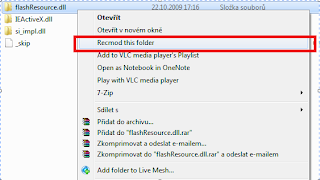
Now run RightClickRecmodInstaller.exe - it should pop up with "Install" button active. Press it. No need to reboot! Now try clicking on module and do "Recmode this folder". Voila, it works!

RightClickRecmod

Tuesday, September 15, 2009

AlbumArtSync


Copy ALL album art from PC to Phone

Works for S2P, Nitrogen, Windows Media Player, HTC Audio Manager and probably all the other more obscure ones as well.

What it does:
It looks though all your music folders in your phone and copies the album art over from your PC

It doesn't copy them if they're already there (clever, huh?) which makes it very quick

What it doesn't do
It doesn't organize playlists, sort things into alphabetical order or play music or anything like that

AlbumArtSync

Saturday, August 01, 2009

PocketPaste


PocketPaste is a small and simple .NET Framework 1.1 application for pasting data from the clipboard of your desktop PC into folders on your device.

For example, you can copy a URL into your clipboard then paste it into a text file or link file on your PocketPC directly via the system tray icon. PocketPaste also supports the copying of files.

This application runs on your PC and does not require you to install any software on your PocketPC, since it uses ActiveSync to transfer data.

requirements
PocketPaste requires that you are running Windows 2000/XP/2003 with the .NET Framework 1.1 installed.

PocketPaste

Friday, July 17, 2009

Mobile Panel


Never miss a call, appointment or SMS

Just connect your Windows Mobile to the computer and you will have missed calls, incoming calls, new SMS and reminders at your desktop. When the Mobile Panel is collapsed it's very small and can be placed anywhere on the screen. When someone is calling or there is a new SMS it pop-ups. There is a number of settings like "Always on top", Transparency, sound etc.

New SMS

Handle your unread SMS from the desktop. Just click at the mail icon and the panel is expanded with the message text and contact information. If you like you can send a reply or delete the SMS.

Incoming Calls

When someone is calling you the Mobile Panel pops-up and expands. You can immediately answer or reject the call.

Missed Calls

When you're missing a call the Mobile Panel pop-ups. Just click at the phone icon to view the list of calls. If you like you can call the contact just by clicking the call button.

Reminders

When your phone is connected to Mobile Panel you will have the reminders at the desktop instead of your mobile phone. You will always see the next appointment.

Mobile Panel

Thursday, July 16, 2009

Max TF3D Theme Maker

Image Hosted by ImageShack.us

Do you use TF3D? Then this is a nice toy for you to play with.

Features:
Customize your theme with a push of a button
Capture other themes components
Special home tab layout configuration with analog clock
Personalized text on home tab ( can be expanded to size and font type )
Auto deployment of theme on scheduled time
Task and command bar color change ( can be expanded to other components )
Font color change ( can be expanded to size and type )
Taskbar icons deployment (do at your own risk)
Lots of components download contributed by the community on POST #4
Shake your phone to auto change wallpaper
WM6.5 Theme Settings + Alpha Blending
Requirement:
Supports WVGA (Components are all tweaked for WVGA)
NetCF 3.5 ( Cab Download )
Supprts standard Manila v3, v2 and v1
Tested on TouchFLO3D 1.3 35601
Tested on TouchFLO3D 2.0 378891 Classic
Tested on TouchFLO3D 2.0 378891 Custom
Tested on TouchFLO3D 2.1 381175 Custom
Tested on TouchFLO3D 3.0 38196

Installation:
If you have older version of MaxTTM, please uninstall before installing the latest version.
copy cab to your mobile
run cab ( recommend to install on storage card )
no soft reset required after installation
to uninstall, go into Settings > System > Remove programs and select Max TF3D Theme Maker
TO UTILIZE ALL FUNCTIONS (PERSONLIZED TEXT), YOU WILL NEED THE "HOME LAYOUT" COMPONENTS FOR IT TO WORK PROPERLY. UNZIP TO THE DIRECTORY YOU'D INSTALLED MAXTTM, OPEN THE APP AND DEPLOY ONE OF THE LAYOUTS
for add-on components supplied seperately through a zip file, just unzip contents directly to the root directory where you have installed the app. It will self extract to the \MaxTTM folders respectively
THE FIRST TIME YOU RUN THE APP, DO A BACKUP FIRST. IF ANYTHING GOES WRONG, YOU CAN DO A RESTORE THEME

Max TF3D Theme Maker

Saturday, June 13, 2009

CHome Visual Editor


CHome Visual Editor is a visual CPR editor for Windows Mobile 6.5.

** You need install .net 3.5 sp1 in your computer in order to run CVE. **

With CVE, you can edit:
Titanium
LS_AlarmScene
LS_LockScene
LS_PhoneAlertScene
LS_PhoneCallScene
LS_SimplePinScene
StartMenu_GridScene

For this release, you can:
Open CPR file visually and move elements visually.
Modify all properties of the selected element by the property grid on the right side.
Change & Save (auto) the screen resolution.
Change & Save (auto) the scale rate.
Undo/Redo
Setup folder mapping between PPC and your OS.
Import registry file to load the element values (text, image source)
Save the modification.
More functions not listed.

This release only provide two language resource. The embedded language is Chinese, en-US is provided. If your OS language is not en-US, you may need to open configuration.xml and add one line to display en-US:
en-us
or you will get Chinese character.

CHome Visual Editor

Friday, February 13, 2009

EveryWAN Remote


The free version of EveryWAN Remote Support is available at no cost, with no time bomb: EveryWAN Remote Support Personal Edition only works over ActiveSync (tethered or via Bluetooth).

Just sync, download and install.

EveryWAN Remote Support is a desktop PC application providing helpdesk staff with an ideal and unparalleled solution for real-time, remote user assistance and troubleshooting on any connected device, that they have virtually “in their hands”.

EveryWAN Remote Support is fully integrated with the EveryWAN Server: a specific “RemoteSupport” tunnel can be allocated to selected groups of mobile end-users – as defined in a given EveryWAN server repository – to allow for remote control operations on their devices.

EveryWAN Remote Support can be operated in a distributed environment, making it possible to take simultaneous control over multiple mobile devices connected to different EveryWAN servers.

This is the only limitation of the Personal Edition. But if you want to be able to support your employees on the field, wherever they are, over any kind of connection, you will need to purchase EveryWAN Mobility Manager which contains Remote Support Enterprise Edition.

EveryWAN

Friday, January 23, 2009

Cab-O-Matic


The ONLY online .cab maker for Windows Mobile powered devices (Beta).

Use of Cab-O-Matic is simple:

Zip up the files you want cabbed (including optional .reg file)
Upload the .zip
Click a few boxes
Download your .cab!

Cab-O-Matic

Thursday, January 15, 2009

Mobile Registry Editor


Access and modify your PPC's registry remotely from Windows

It is perhaps both a curse and a blessing that Windows Mobile is fast becoming the number one mobile operating system. Most of us use Windows at home and in the office so the interface, applications and settings on a Pocket PC are familiar. Unfortunately, so are some of the problems we encounter.

This is the reason that Mobile Registry Editor is a great tool. As you’re most likely aware, a huge number of problems with your Windows desktop machine can be fixed via changes to the registry. Similarly, the registry may well need ‘cleaning’ or at least some sort of inspection from time to time as a way of making sure it doesn’t contain redundant or malicious entries. The same applies to your Windows Mobile device. Mobile Registry Editor allows you to explore the complete registry database, make changes and add or delete keys as required. Its interface is pretty much identical to that of RegEdit, with just the addition of some minor extra features, ‘favorites’ being the most useful.

While Mobile Registry Editor doesn’t contain any automated tools (such as ‘clean registry’ for example), it is still a potentially very useful utility for advanced users. It should be stressed, however, that less experienced users should exercise caution using tools of this type – both on their desktop computers and Windows Mobile devices – to avoid causing damage to their operating system.

In all, Mobile Registry Editor is a simple and well designed tool for managing your Pocket PC’s registry, but it is not recommended to beginner-level users.


Mobile Registry Editor

Monday, November 03, 2008

CabGen

Create .CAB configuration files for Windows Mobile

How does this work?

This page will allow you to create a self-installing .cab file with configuration settings for your windows mobile phone. What this script does is turn your wap-provisioningdoc xml code into a .cab file. This functionality is left out of Visual Studio, and all the good cab creators are not free. This is quick, free, and easy!

CabGen

Sunday, October 12, 2008

Registry Changer Cab Creator

This tool will create a CAB file for Windows Mobile 6.0/6.1 containing any of the selected registry entries.

If you uninstall the cab file, all registry entries will be reset back to normal. Check the options below that you would like to include in your cab file. These registry changes should work for WM6.0 and 6.1 devices. Use at your own risk.

Registry Changer Cab Creator

Friday, October 03, 2008

Windows Mobile SMS Sync


Windows Mobile SMS Sync allows users of Windows Mobile Devices (Smartphones and Pocket PCs) to backup their SMS (Text Messages). ActiveSync does not have any native support for this feature.

Some of the features in this release are:

* Streamlined installation application.
* Full Userguide.
* Ability to save to CSV file.
* Windows Desktop application for viewing and searching messages.
* Wizard for uploading messages to a SQL server database.

brianhama

Friday, September 19, 2008

Install Builder


Install Builder is a free standalone application that allow novice user to create setup cabinet for Pocket PC and Smart Phone.

Install Builder use a simple ini file to store project settings, you can use simple editor like notepad to edit the ini file.

The setup cabinet contain binary encoded and xml installation file plus all application files. It support two installation mode (ActiveSync --> PPC, PPC --> PPC). The setup cabinet can copy files, make shortcuts and add registry keys.

Requires the .Net Framework 2.0 too!

lycj of XDA-Developers

Monday, September 08, 2008

SeekCover


CD Cover Manager for Windows Mobile (Smartphone/PocketPC)

With SeekCover you access your device remotely and copy CD Covers / Album Art to any folder on your device.
Using the 'Search Online' tab, you can find and copy artwork quickly to your device at ease.

Downloaded Album Art is automatically shown using Windows Media Player for Windows Mobile.

SeekCover

Friday, September 05, 2008

XPERIA X1 SDK


Sony Ericsson Beta SDK for Windows Mobile® 6.1 (v1.0.3) (9.1 MB)

The Sony Ericsson Beta SDK for Windows Mobile® 6.1 is a set of tools, plug-ins and documentation that allows you to develop and test XPERIA™ Native Panels, XPERIA Web (HTML) Panels and applications for Windows Mobile 6.1 for XPERIA X1 phone.

The Microsoft® Visual Studio® IDE Plug-in allows you to develop and debug XPERIA Panels that run on the XPERIA X1 phone using the included XPERIA X1 Device Emulator.

XPERIA Panels are Windows Mobile applications that extend the Today Screen API in order to provide a Full Screen immersive experience. Developers can create XPERIA Panels for the XPERIA X1 phone using the Sony Ericsson Beta SDK for Windows Mobile 6.1.

Sony Ericsson

Saturday, March 29, 2008

FBA The Creator


FBA is the easiest way to create Games And Applications for your PocketPC!

* Easy, Fast and Powerful
* Create your GAMES and APPLICATIONS with very basic and easy language
* Develop and test on Windows with a powerful IDE
* Build PocketPC setups with just one click
* Run your product on major PocketPC with Windows Mobile
* Add resources to your project and load in your game with one line of code
* All in one package! You don't need external programs
* Much much more...Oh, and it's FREE!

FBA

Friday, February 29, 2008

Mobiano Themes Box


Mobiano Themes Box is a free utility to change your Pocket Pc Today Screen Themes at your desktop computer. It provides thousands of themes in our website to you. When you applying to device with one click, it will download the theme (.tsk) file from internet and install the theme into your PPC.

Mobiano

Thursday, February 21, 2008

MortScript IDE


Now it is easy to write your MortScript codes by using

MortScript Integrated Development Environment v0.1

Portable Version Works on
Windows All version (Tested on Windows XP)
Linux (Tested with Wine v0.9.22 on openSuse 10.0)

Known issues:
1. Block code are not working for Sub, EndSub, IF, EndIF, For EndFor, ...
2. All usage of ForEach function can not be shown.
3. Comments do not have different color.

pi3ch of XDA-Developers