Showing posts with label launcher. Show all posts

Thursday, July 29, 2010

SciLor's LaunchMe


SciLor's LaunchMe is a tool that allows to run applications just by typing their name.


You may know a similar tool for Windows called Launchy.

You will need the .NET Framework

SciLor's LaunchMe

Tuesday, July 27, 2010

WiMoRun


A Start->Run Equivalent for Windows Mobile

Quick Links are okay, but what about running an application just by calling it's name like in Windows with the Run command quickly? This tiny app does just that. Just at the moment it can only run programs within the folders in the PATH variable, but this will change. also an autocomplete is planned.

WiMoRun

Saturday, July 24, 2010

BatchLaunch

launch multiple executables automatically one after another.

The application consists of two files:
BatchLaunch.exe
BatchLaunch.bat

The .exe file is the batch processor, the .bat file lists the commands to execute.
At the moment two types of entries in the .bat file are supported:
Direct paths to executables, for the moment only .exe files
wait() command, getting parameter milliseconds to wait, e.g. wait(1500) to wait 1.5 seconds before processing next line

Multiple BatchLaunch apps at the same time are supported by simply renaming
both, .exe and .bat file.

So if you want to use a second set of BatchLaunch you could name it Something.exe and Something.bat.

BatchLaunch

Monday, July 05, 2010

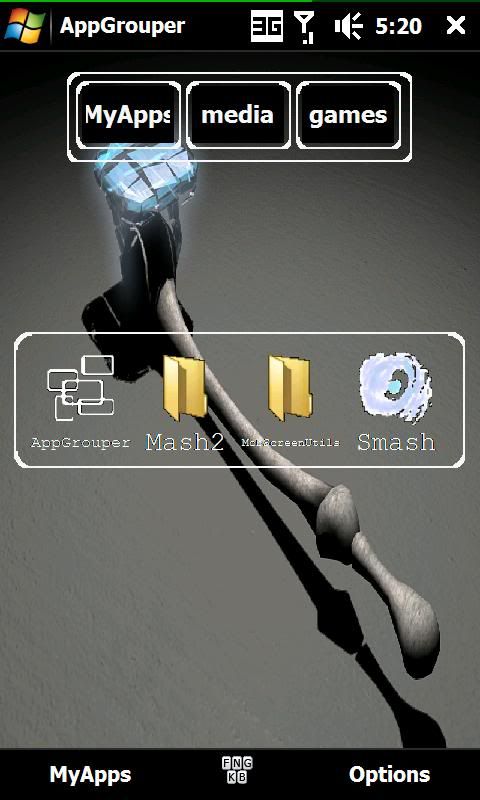
AppGrouper


a simple catagorised app launcher

this is an app launcher that organizes the programs you use the most.

AppGrouper

Wednesday, February 03, 2010

Gen.Y DualBOOT


Dual boot solution for Windows Mobile devices with XDANDROID

This app is launched by a registry key created in [HKEY_LOCAL_MACHINE\init], so it launches directly at boot after shell gets initialized.
Chefs: If u are going to cook this app into your ROM, make sure that this key gets added DURING your customization procedure (and not before!)

There are 2 checkboxes, enabling automatic boot:
AutoBoot: enabling this mode will automatically boot the OS of your choice after a 10 second countdown
> disabling autoboot will remove the countdown completely
FastBoot: enabling this mode will automatically boot the OS of your choice after a 3 second countdown (requires AutoBoot to be enabled first)

Now apart from these 2 checkboxes, u have 2 radiobuttons, which allow u to choose which OS gets automatically booted.

And last but not least, u have the 2 manual launch buttons. Pressing these buttons will directly launch (overriding autoboot) Windows Mobile or Android.

Registry
Gen.Y DualBOOT checks for 5 registry keys, which allow some form of customiation. Apart from the last key (StorageBootMode), all keys can be modified utilizing the radio & check buttons in the GUI. All of these keys can be found in:

[HKEY_CURRENT_USER\Software\Gen.Y\DualBOOT]
Here's quick list describing what the keys are for
"AutoBootEnabled"=dword:1 (1: enable autoboot | 0: disable autoboot)
"FastBootEnabled"=dword:0 (1: enable fastboot | 0: disable fastboot)
"AutoBootAndroid"=dword:1 (1: boot Android | 0: boot Windows)
"StorageBootMode"=dword:0 (1: boot from Storage Card (SDMemory) | 0: boot from Internal Storage (moviNAND))
"AndroidBootFolder"=dword:0 (1: boot from \Android\ folder on storage (e.g. \Storage Card\Android\haret.exe)| 0: boot from root of storage)

The example values are the ones that are in the CAB for Internal Storage devices.

Gen.Y DualBOOT

Tuesday, November 10, 2009

TellMe


Say It. Get it.


With Tellme :
- Voice to Text Messaging.
- Voice Activated Dialing.
- Web Search.
- Businesses.
- Stocks.
- Sports Scores.
- Weather.
- Movies.
- Traffic.
- GPS enabled.

TellMe

Wednesday, October 21, 2009

JMLLauncher


JMLLauncher plugin is a Titanium Application launcher + Page/Plugin Moving.

JMLLauncher works with JMLPanex.

Version 1.00:
- TICS installation (from @MichelDiamond)
- Default skin + BlackHD skin (from @Ghenarys)
- Add/Remove Icon, Change Icon text
- Associate Program
- Associate #GOTO moving (goto Page and/or goto another Plugin)

JMLLauncher

Tuesday, October 13, 2009

Start Launcher


start a program by Start Button: you can assign short and long taps

The program is written without Dot Net, using Native C++, so it's small, does not consume resources. Works on QVGA, VGA and WVGA devices with WM2003, 5, 6, 6.1, 6.5 (if the Start button placed on the left upper corner only).

Start Launcher

Sunday, August 30, 2009

ZLaunchy


ZLaunchy was written mainly for those who like the way Windows Mobile dialer allows searching for contacts in a T9-like way - so that finding Adam means choosing 2326 in the phone application.

ZLaunchy uses the same idea to run programs on your device. What it does is gives you a dialer keypad and when you type in a series of digits, it searches for all programs that match - for example to start Internet Explorer, start typing 4683 - Internet Explorer and Internet Sharing should show up in the result list.

This application performs a search using all items in the Start Menu. It also skips showing application icons, which causes it to work faster than usual application launchers. This makes ZLaunchy a perfect candidate for an application that's bound to a hardware key (using system settings) and have it always handy when you want to find an application quickly. change setting to keep your device alive and tend to reset without quitting them. This app will restore settings to your preferred ones.

ZLaunchy

Monday, August 17, 2009

myAction


30 buttons Action Screen for WM - like iPhone - VGA

INSTALLATION
Run the CAB file from your device. Installation on device memory is recommended (it copy 3 files to \Program files\myAction).

myAction

Saturday, July 25, 2009

Easy Today Launcher


Easy Today Launcher is a today Plug-In lets you add shortcuts to their favorite aplication on the today screen.

Compatibility: Windows Mobile PocketPC
Screen resolution: VGA, WVGA, QVGA, WQVGA

Easy Today Launcher

Thursday, July 16, 2009

SmartLauncher


Turn On WiFi and launch Opera in one click

What does it do:
- Activates WiFi & connects to preferred access point
- Shows connection strength, IP, SSID name and authentication mode
- Able to launch Opera browser with the same button that enables WiFi
- Turn off WiFi when done

Limitations in this beta version
It only works on TD2 for the moment where OperaL.exe is in the Windows directory like the stock HTC ROM.

SmartLauncher

Tuesday, June 16, 2009

G-Trigger


G-Trigger is a G-Sensor based ^shake^ detector application for Windows Mobile.

It allows to trigger a predefined action on shaking your mobile phone in particular direction. Currently it is in very rough development phase, so please bare the bugs.

Supported shaking directions:

Horizontally
Left to right
Right to left
Vertically
Top to bottom
Bottom to top
Front & Back
Front to back
Back to front
It will trigger the specified action when phone is forcibly moved from left to right or moved as above mentioned directions.

Features:
Customized actions
Conditional actions
Suspend exceptions
Disable action exceptions
Run service on device start-up
Individual threshold settings for all three directions; Horizontal, Vertical & Front-Back
Action feedback vibration settings
Action feedback play sound settings
Profiling
Different actions for different applications
Settings for On Screen Display of triggered actions
AppToDate support (What is AppToDate?) (Download)
Supported actions:
Close/Minimize active window
Dial a number
Answer/Reject incoming call
Launch Program
Ringer Loud/Vibrate/Silent
Screen orientation
Send Keys*
Task Switch
Screen On/Off/Toggle
Media Control# (Play/Pause/Next/Previous/Volume)
WiFi/Bluetooth/Phone Radio - On/Off/Toggle
Volume Control
Simulate Power Button - Power On/Power Off/Long Press Power Button
Open control panel settings
Activate profile
*Please refer to readme.txt for sending special keys.

#Currently supported media players are

Windows Media Player
S2P
Microfi Nitrogen
Core Player
TCPMP
Pocket Player
Pocket Music
Manila (TF3D) Music Tab

G-Trigger

Saturday, June 13, 2009

OzzY's Action Screen


a nice, fast and versatile action screen

FEATURES:
very small and self-contained (one EXE, ~90KB)
extremely fast, no managed code, pure C++
build-in Raphael flashlight support, both normal and bright modes, no timeout
keeps flashlight on after pressing power button (display goes off)
build-in Bluetooth and WiFi mode toggle function
support for landscape mode
to exit app without action, just tap the empty space (HTC logo)
bonus action, activates task manager (taskmgr.exe) when D-PAD center is pressed ;)

OzzY's Action Screen

Thursday, March 19, 2009

Finger Point


New application launcher

This is the first release so it can have some bugs. It was tested only on samsung omnia so if you get it running on other devices please let me know.

If you'd like to configure the favotires,icons etc. find the installation folder - usually in Program Files and look for files:

Favorites.txt - add any application to the list and you should see it in favorites,
Icons/Icons.txt - will assign new icons to apps (name, icon). You can add any png 48x48 or 32x32 image - see Icons folder.
Exclude.txt - add app to the list and it will be excluded from the app list.

Finger Point

Monday, February 09, 2009

MiniFlow


MiniFlow is a utility to minimize windows application temporary, and serve as a minimized-application station, and manage them in certain way so they can be relaunch at the future. This can be very helpful when working between a lot of diffrent applications at one time.

Mechanism

MiniFlow is a very simple application for processing simple tasks, thus makes it very easy to use.

When working on the several applications, launch MiniFlow to minimize the most current application and/or to switch to another application. Then after MiniFlow is launched, the most current application is minimized by MiniFlow. Then user can select from the MiniFlow another application that previously had been minimized to start working on it.

After MiniFlow is launched, it stays in the background wait to be relaunched again.

Installation

MiniFlow only comes with a single executable file, with the name 'MiniFlow.exe' and you can find it in the distribution package. So the installation is simply copy it to your device at desired location. It recomended to create shortcut or quick launch for the application, and it would be the best if using hardware button for shortcut.

Limitation

Basicaly, MiniFlow allows all well designed application to be processed, however in the implementation, there might be some application that just can not be handled by MiniFlow because of some restrictions. MiniFlow does not handle sub-window of an application, such a dialog boxes or popups, only main window is recognized.

MiniFlow currently does not have awarenes and does not manage minimized-application's processes and/or threads, so if they have been shutdown beyond MiniFlow, MiniFlow does not immediately realize it.

MiniFlow

Friday, January 02, 2009

iShell 0.22


Currently, it's a fairly basic launcher application

It also has "widgets" (currently one, the clock) which aim to replace other applications and so integrate as much functionality as possible.

Press the end call button to exit.

Requirements:
WM5 or above
Anything bar square screens...
400kb free RAM and 400kb free ROM.


Change log:
0.22 - customisable backgrounds have arrived, along with custom text colours and some bug fixes.
0.21 - now supports VGA and WVGA/WQVGA, changing the TransitionSpeed actually works now.
0.2 - Bug fix - SMS now loads the correct path, and you are asked whether you wish to run iShell after the install.
0.1 - Release

Coming soon:
Landscape
More widgets
Square screens
Some other things...

iShell

Tuesday, October 07, 2008

TouchLaunch


TouchLaunch is simple application launcher, which scans start menu shortcuts, and list them alphabetically.

Kind of similar to scoll launcher
but this has new quick alphabetic scroll function. This is very early alpha and my first program release.

Features:
-finger scrolling
-quick alphabet shortcuts
-skinnable ( only color modification for now )

avellant of XDA-Developers

Saturday, June 28, 2008

MusicFlo


New Customizable App Launcher

- a TouchFlo 2 style clock
- notifications for new email, text messages, missed calls, and voicemail
- One for programs with TouchFlo style interface (up to 9 pages of 9 buttons each)
- One for contacts with TouchFlo Style interface (up to 9 pages of 6 contacts each)
- One for Favorites with the ability to take a screenshot of the web page for "Visual Favorites" (up to 9 pages of 4 Favs each)

The configuration is built into each screen. Simply tap and hold to make the buttons start to shake, then tap the button you would like to configure, or tap the background to change the background image and change how many program, contact, or favorite buttons you would like.

Musicman247 of XDA-Developers

Thursday, January 24, 2008

ThrottleLauncher


ThrottleLauncher is a launcher app designed for Windows Mobile 6.

Basically it consist's of several pages containing rows. Each of the rows depending of it contents can be scrolled horizontally by using the finger. The app is fully configurable through xml files so the rest of the features depends on the diferent setups.

The rows can contain several type of items:

* icons: can execute any program or link.
* clock: analog clock.
* text: can be updated periodically and can contain dinamic dates or registry values.
* photo dialer: you can place contacts with asociated photos on a row.
* running and recent apps: all running and recent apps can be shown inside a row.

Main features:

* Kinetic scrolling
* Fully configurable
* Skin support

ThrottleLauncher