Showing posts with label contacts. Show all posts

Wednesday, March 03, 2010

Export_Studio


This application is a very useful free alternative to those expensive Contact backup applications. It will backup/export your Contacts and SMS

This program includes:
A super-simple, lightweight GUI
The Ability to backup Contacts and SMS
Three modes of exporting: TXT and CSV and VCF
A comand-line based version of the GUI program

To Install:
Simply download the CAB file, and install it
Then navigate to Start Menu > CycloneApps > ExportStudio
and voila!

To use:
First, run the app and you will see 3 areas : What you want to output, the output format, and the folder to write to.
Select what you want to ouput
Make sure to ONLY PUT THE FOLDER in the folder text box, or you will get errors or weird results...
Once set up, click export, and the application will do its thing!
If you want to use the command-line feature, then just run the same EXE as for the GUI with parameters afterwards (see documentation)

Tips:
While the CSV format can be opened in Excel or the likes, I find that the TXT format is more organized.

Export-Studio

Thursday, December 31, 2009

Shake 2 Send


Send contacts between devices

Basically, what happens is, you shake two devices at one time, and a server pairs the two.
Then one selects a contact and they both shake to transfer it.

Instructions:
1) Download the client.
2) Extract the ZIP file onto your phones Storage Card. (More than one phone)
3) Download the server.
4) Extract the server ZIP file onto your computer.
5) Run shake2send_server.exe, and disable any firewalls that might pop up.
6) Run shake2send.exe on two (or more) phones.
7) Enter your computers IP address, and a unique name.
8) Press connect, and shake two devices at the same time.
9) Press Send on one device, select a contact, and then shake the device.
10) When the file moves to the other device, shake it, or press Accept.

Shake 2 Send

Monday, October 26, 2009

MyContactRenamer


Rename contacts on windows mobile

The program is called MyContactRenamer and, as is easily guessed from the name, is to rename your contacts to Windows Mobile. In fact, the default Windows Phone Save contacts in two ways: "First Last" or "Last, First". With this program you can instead use any name to save the contact. The operation of the program is very simple. When you start the program loads all the contacts on the phone and display them in a list. Once you select a contact name is shown in the box below. After changing the name just click the button "Rename" and the program will apply the changes. E 'II compatible with all devices (with all the resolutions) and to work requires. NET Compact Framework 2.0. After the jump find the CAB to install on your device.

MyContactRenamer

Sunday, September 27, 2009

Nektra Contact Manager


Nektra Contact Manager is a finger friendly contact manager specifically designed for busy people who need to manage a huge number of contacts.

Features:

Finger friendly controls
List controls provide a smooth scroll
Contacts can be grouped by Company or by Groups (touching the bottom tab Contacts button you can switch the views)
Sms list
Phone calls (touching the bottom tab Calls button you can switch calls views: Incoming, Outgoing, Lost, All)
Keyboard for contacts fast search (press 'Undock' button)
Favorites can be accessed in iPhone way
Scroll with the finger or using the right side scrollbar to go to a certain place
Contact photo display

Nektra Contact Manager

Saturday, September 12, 2009

Contacts Search


This is application for fulltext searching in contacts.

Supporting multi pattern search and option 'Case sensitive search'.
New optional large font option (finger friendly) and Scroll result with finger.

Requirements:
Windows Mobile Pocket PC 5 , 6 , 6.1, 6.5 - tested
.Net Compact Framework 2.0
Support QVGA, VGA and square screen display - tested

You can search in contacts informations :
* Full name
* Full home address
* Full work address
* All contact phone numbers
* All contact emails
* All contact IM address and Nickname
* Contact Body
* Company and Job title
* Categoties
* Department
* Children
* Manager
* Assistant Name and Phone
* Web page (Only valid URL are supported - valid URL contains http://)

Application shown all found contacts in result grid when search text are found in contact information.

You can use multi pattern wildcard *
Example : scot*com found contacts 'Scot Vicom' and 'Scot and Company'

You can set option "Case sensitive search" when you need.

In result grid are shown abbrevs for selected informations. When search text are found in this information, column contains word 'Yes'.

You can open contact from result by double click on it or pressing Enter key on main cross button.


Contacts Search

Tuesday, August 04, 2009

Back FavPeople Up!


Backup & Restore of HTC Favorite Contacts

Version 1.0 (Released on 3rd Aug 2009)
First public beta release
Requires .NET 3.5CF to be installed
Only supports backing and restoring of favorite contacts (and default call method) in TouchFlo's "People" tab
Sashimi user can place the executable file in the EXE folder and run.
Ringtone and other contacts backup/restore are not supported

Back FavPeople Up!

Saturday, July 25, 2009

BookSync


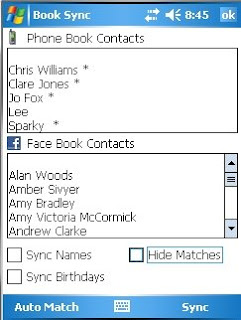
This is an application for Windows Mobile phones that will allow you to synchronise the pictures of the contacts in your phone with profile pictures of your friends on Facebook.

Now you can sync birthdays and names too.

Because phone book contacts may not match with peoples real names on Facebook you first match the contacts. This matching is then stored for future synchronising.

BookSync requires the .net compact framework 3.5 this will need installing first.

Usage:
Load the application and log into FB, BookSync will then get your FB contacts and your phone contacts. You will then be presented with 2 lists. Click on a mobile contact and select the appropriate FB contact. A star will be shown indicating that the contact is matched. Repeat this for all contacts.

Hit Sync. BookSync will then download the users profile pictures and set them as your phone contact pictures.

Thats it... simple. If people have updated their profile pictures, launch BookSync all the matching will have persisted from the last time so just hit sync and you are up to date.

BookSync

TrineFix


TrineFix is a free utillity for contacts, appointments and tasks on yourWindows Phone (and if you sync with a PC or ExchangeServer, also on your PC).

Main features:
Remove "close match "duplicate contacts (and You decide what fields must be similar to define it as a "duplicate")
Option to automatically remove any "exact match" duplicates (if their identical, you only need one, right!?:-)
Set FileAs for contacts ("Firstname Lastname", or "Lastname, Firstname", and so forth)
Add a default CountryCode-prefixes for phonenumbers that do not have a countrycode
Change the countrycode-formatting ("001", "+1", so forth) for all phonenumbers
Remove duplicate appointments
Bulk remove several appointments, contacts or task with a searchword
Preview fixes before applying, and you can even manually adjust the fixes before applying in most cases
Fingerfriendly user interface (if you have a touchscreen)
Keyboardfriendly user interface (is you have a keypad)
Adjusts itself automatically to different types of devices (touchscreen/non-touchscreen) and screentypes (QVGA, VGA, WVGA, square screens, ...).
Built in functionality that notifies you about new releases of TrineFix, and makes it possible to upgrade easily directly from your phone
Share with friends (send SMS with download links to a friend)

Compability

This program should work with all Windows Mobile devices, that has WM2003 or later (has been tested on Smartphones, Professional Edition, QVGA, VGA, WVGA, 320x320). The program requires that "Microsoft .Net 3.5", is installed on the device.

TrineFix

Thursday, July 23, 2009

List As Editor


List As editor patches a simple little flaw in the 'Contacts' application on Windows Mobile.

The contact management software only gives you two choices for how to file a contact, "Firstname Lastname" or "Lastname, Firstname." However, there are times when this isn't desired. For example, if you list your mother with her proper contact details (including first name and last name), you may want her to show up on your contacts list as "Mom" instead of "Judy Jane." In the past, there has been no way to accomplish this, short of setting the First Name to the desired listing name, and leaving last name blank. Now, you can use List As editor to list your contacts precisely how you want!

Use:
Install the program (download links below). Launch the program by going to Start->Programs, BAFTools, List As Editor. Then select the contact you want to edit the list as value for and click edit. Edit the value and click save. It's as simple as that!

List As Editor

Tuesday, June 09, 2009

Contact Cleaner


Contact Cleaner is a program for your Windows Mobile 5.0+ phone that helps you remove duplicate and redundant contacts.

Ever get a new phone, sync it to your existing Exchange account, and end up with hundreds of duplicate contacts? Accidentally create a duplicate contact but with different information, and then need to figure out which one to keep and which one to delete? This program is for you!

How it works

Contact Cleaner works like this:
1) Scan the Contacts database, looking for duplicate contacts.
2) Exact duplicates are deleted.
3) Near-duplicates are displayed for manual merging/removal.
4) You go through the sets of near-duplicates, where you can see all the values which are different, and choose to keep, delete, or merge Contacts.

Contacts with the same "FileAs" property are compared against each other, except for the ItemId and Picture properties.


Contact Cleaner

Sunday, May 24, 2009

OutSync


OutSync is a free Windows application that syncs photos of your Facebook friends with matching contacts in Microsoft Outlook.

It allows you to select which contacts are updated. So you can update all contacts at once or just a few at a time.

The main benefit of OutSync is for Windows Mobile users. Updated contacts are automatically synced with Windows Mobile devices by Exchange server or ActiveSync. Thus new and fun photos appear during calls and other places where contacts are used.

OutSync is compatible with Windows XP, Vista and Server 2003. It requires Outlook 2003 or 2007.

OutSync

Sunday, May 17, 2009

Easy Contact


Easy Contact is a finger-friendly contact, SIM and CallsLog manager for Windows Mobile PocketPC phones.

This is a ALPHA version and only support VGA and WVGA screens. (by the moment).

Main Features:

- Contact Manager;
- SIM Manager;
- CallLog Manager;
- Favorites Manager;
- Language customizable;
- Skinnable;
- Finger-friendly;
- Intuitive;
...

Easy Contact settings can be found in: "HKEY_LOCAL_MACHINE\Software\LoFFactory\Easy Contact\Settings".

Easy Contact

Monday, April 20, 2009

Favorite People Plug-in


WM6.5 Favorite People Plug-in

This plug-in allows you to add your favorite contacts to the WM 6.5 CHome (aka Titanium) homescreen.
Supports VGA, WVGA, QVGA, WQVGA, and QVGA Square

Install:
1. Install the .Net Compact Framework 2.0 or higher if you don't already have it. (It's required but most cooked roms have it)
2. Install the attached ATContacts v0.91.CAB to Device
3. Enjoy easy access to all your favorite peeps!

-------------------------------------------------------------------------

Usage:
Tap the "Select Favorite People" panel to add a contact and a phone number of your choice.
Tap the contact panel to view the contact card.
Tap the "Call" softkey to initiate a phone call to the stored number.

Favorite People Plug-in

Tuesday, March 17, 2009

RenameContacts


Change the "File As" on a contact without Outlook.

I don't have Outlook installed on my desktop, and I wanted to rename some of my Contacts. File As options I had were: "First Last", OR "Last, First." Kinda weak.

RenameContacts

mobidjiin


a small utility that is supposed to give you some informations about your device, allow you to easily navigate through your contacts

This is a alpha release it doesnt' mean there big bugs or memory leaks it means that lots of menu are not handled, picture are poor qualities ...
It will be be plugin-based and the next version will add the following module :
Smartphone version
More device info
OpenGL ES info and benchmark
Message handling(SMS,MMS, Outlook)
File association in Explorer

mobidjiin

Tuesday, February 10, 2009

PimImporter


Import contacts and messages into windows mobile from csv files exported from Nokia PC Suite.

Instruction
- Install cab on memory card
- Export csv contacts file from Nokia PC Suite
- Save csv on memory card
- Open the program and choose csv
- Map the columns you want to import

The program has a default map for the csv of ITA vers. of PC Suite.
In the future maybe i add a map for the other languages.
But it's not a problem, you can map the columns manually.

Happy import!

PimImporter

Thursday, February 05, 2009

Yota Contacts


This is Yota Contacts, an application lifted off the HTC Quartz (MAX 4G) which is WiMax device on russian operator, Yota's network.

Benefits:

- Yota Contacts completely replaces the built in windows Contacts application.
- New dialer that's much faster then the built in dialer.
- Favorites groups
- Better onscreen keyboard\
- Much more, which I'm sure you'll find once you install it and play around...


Minuses:

- Will NOT read your SIM contacts. You would have to copy them to the phone memory if you want to use Yota Contacts.
- No easy VoiceMail access (holding down 1 doesn't work). The "New Voicemail" link on TF3D's homescreen also doesn't work.
- No "face down mute" feature.
- No "bluetooth on/off switch" while in a call.
- No "Slide to Answer".
- No "Company Directory" lookup if you're hooked up to a company Exchange server.
- This app doesn't display special characters in the contact names.
- S2U2's caller ID functions HAVE to be disabled if you have the Yota Dialer also installed. (S2U2 conflicts with the Yota Dialer)
- If you have a password lock on the phone, it will impede your ability to answer the phone quickly, because you will have to input the password before you can hit "Answer" on the screen.
- No video calling or "Videoshare" (yet)

Yota Contacts

Friday, January 02, 2009

SIMShowHide


a small application that will hide or show your SIM Contacts from the Contacts Menu.

To use it, just put it in your phone and run the application. It will modify the registry to show or hide your SIM Contacts (depending on the current setting)..

Example, if you Registry is configured to show SIM Contacts, then the registry will be modified to hide it.

If the current setting is hide, then it will be modified to show it.

Version 1.1

Added parameters :

/hide - hides the SIM Contacts

/show - Shows SIM Contacts.

SIMShowHide

Monday, September 08, 2008

Turbo Contact backup


Backup your Contacts easily.

* Save all your contacts to a XML
* Save all your SIM contacts to a XML
* Restore all your contacts from a XML
* Restore all your SIM contacts from a XML
* Delete all your contacts
* Delete all your SIM contacts

TCB

Friday, August 08, 2008

OS Contacts Manager


A tool to edit contacts by batch.

With OS Contacts Manager, you can easily choose several contacts and change their Category, Ringtone, and Oist SMS tone, or delete them simultaneously.

Note: If you have a large collection of contacts, it will take some time for the application to load.

Download Video Preview


Download ZIP File